CarX Drift Racing 2 help center
Frequently Asked Questions
Find clear, practical answers about CarX Drift Racing 2 on Drive Easy Hire. Learn how to start drifting, fine-tune your cars, master controls, and keep your progress safe.
Getting Started with CarX Drift Racing 2
Learn how to download, install, and set up CarX Drift Racing 2 so you can begin your drifting career smoothly.
How do I download CarX Drift Racing 2 on my device?
- On Android, open Google Play and search for “CarX Drift Racing 2”, or go directly via the button below.
- On iOS, open the App Store and search for “CarX Drift Racing 2”.
- Check the publisher and permissions, then tap Install or Get.
- Wait for the download to finish and launch the game from your home screen.


Do I need an account to play and how do I create one?
You can start driving immediately without registration, but linking your profile is strongly recommended to protect your progress.
- Open the in-game Profile or Account section from the main menu.
- Choose a sign-in option such as platform account or another available service.
- Follow the prompts to authorize and link your game profile.
- Verify that cloud sync is enabled so your data is backed up.
What should I do first after installing CarX Drift Racing 2?
- Complete the initial tutorial to understand acceleration, braking, and basic drifting.
- Visit the Controls menu and choose a control scheme that feels comfortable.
- Start in single player modes to learn how your first car behaves.
- Gradually increase difficulty, then move into online rooms when you feel confident.
How to Earn and Use Points
CarX Drift Racing 2 rewards precise, stylish drifting. Understanding how points work helps you progress faster and unlock more content.
How do I earn drift points efficiently?
- Maintain long drifts: Keep your car sideways for as long as possible without straightening.
- Use higher angle safely: Larger drift angles can score more but are harder to control.
- Stay close to clipping zones: Follow the ideal line near walls and markers.
- Avoid collisions: Crashes or going off-track reduce or reset your combo.
- Chain drifts together: Smooth transitions between corners keep your multiplier high.
What can I spend my points and in-game currency on?
Rewards from drifting can be used to:
- Unlock new cars: Purchase additional vehicles suited for different drift styles.
- Upgrade performance parts: Improve engine, suspension, tires, and other components.
- Buy visual items: Invest in paint, decals, and body kits to personalize your builds.
- Access new tracks or modes: Some content may require reaching certain progression milestones.
How can I maximize my in-game rewards over time?
- Practice on tracks you know well to achieve consistent high scores.
- Use cars with setups you are comfortable with instead of switching constantly.
- Participate in events and challenges that offer bonus rewards.
- Avoid quitting races early, as this can reduce the payout you receive.
Drifting Controls Explained
CarX Drift Racing 2 offers multiple control schemes so you can choose how you steer, brake, and manage throttle while drifting.
What control schemes are available?
- Tilt: Steer by tilting your device left or right. This feels natural and keeps the screen clear.
- Buttons: Use on-screen arrows or steering buttons. This offers precise taps and is easy to learn.
- Steering wheel: A virtual steering wheel on the screen for more analog control.
You can switch between these options in the game settings under Controls.
Which control option is best for drifting?
There is no single best option; it depends on your driving style:
- Tilt is great if you like gradual steering inputs and play without touching the sides of the screen.
- Buttons are ideal for quick reactions and consistent left/right taps.
- Steering wheel suits players who want fine-grained angle control similar to a real wheel.
Try each scheme on an easy track and choose the one that feels most comfortable and predictable.
How can I improve my car handling with these controls?
- Adjust sensitivity in the control settings until steering reacts the way you expect.
- Use throttle modulation instead of full gas everywhere; small lifts can stabilize the car.
- Practice feathering the handbrake to initiate or correct your drift angle.
- Repeat the same corner multiple times to learn how your inputs affect the car.
For more advanced driving techniques, visit our dedicated drift page at /drift/.
Tuning and Customization FAQ
Fine-tune your setup to match your drift style and make each car feel unique, both in performance and appearance.
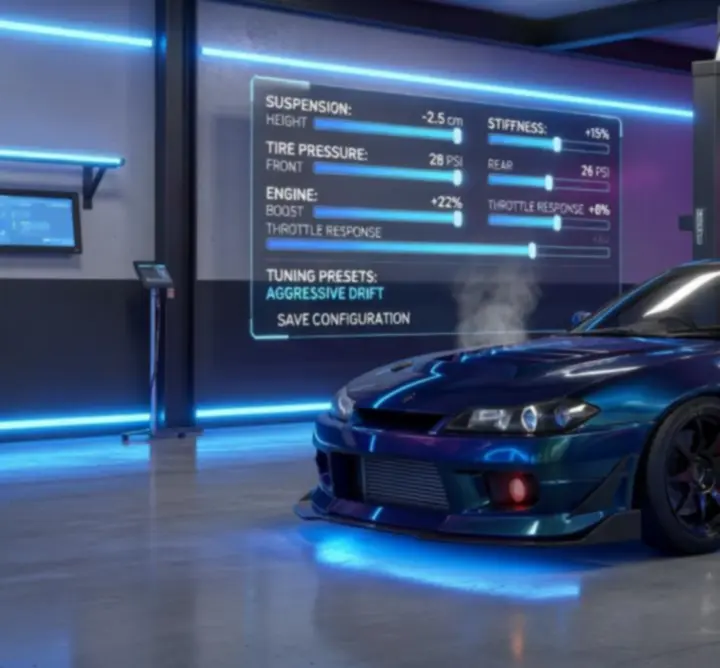
How do performance upgrades affect my drifting?
- Engine power: More power helps maintain long drifts but can make the car harder to control.
- Suspension: Influences body roll, grip, and how weight shifts during transitions.
- Tires: Determine available grip; lower grip can initiate drifts easily, while higher grip provides stability.
- Gearbox: Adjusts acceleration and top speed, which affects how quickly you can exit corners.
Experiment with small changes and test them on the same track to feel the difference.
How does tuning influence my drift style?
Different setups support different driving styles:
- Stable setups (more grip, softer transitions) are forgiving and suited for beginners.
- Agile setups (quicker steering response, more rear bias) let advanced players perform aggressive transitions.
- Angle-focused setups help keep extreme drift angles but require precise control.
To dive deeper into setup theory and example builds, visit our tuning hub at /tuning/.
What is the difference between visual and performance customization?
- Visual customization changes your car’s appearance only (paint, decals, body kits, wheels, etc.).
- Performance tuning directly affects how the car behaves on track.
Mix both to create signature builds that look sharp and match your preferred handling.
Unlocking New Cars and Tracks
Progression in CarX Drift Racing 2 gradually opens up more vehicles and locations as you improve your skills.
How do I unlock additional cars?
- Earn in-game currency and points by drifting and completing events.
- Reach the required in-game level or progression milestone for each vehicle.
- Purchase the car from the in-game car list once requirements are met.
Try a mix of different cars to discover which platforms and drivetrains suit your style.
What do I need to access new tracks?
- Advance through the game’s progression by racing, drifting, and completing objectives.
- Reach the unlocked stage or rating required by specific tracks.
- Some tracks may be tied to events or specific modes; check the event schedule regularly.
Each track favors different lines and speeds, so practice them individually to improve your consistency.
XDS Scoring System
Understand how the Twin-Drift (XDS) mode evaluates your driving so you can climb the rankings in tandem battles.

What is the XDS twin-drift system?
XDS is a mode that simulates real tandem drifting battles. You complete a lead run and a chase run, and the system compares your performance to an ideal line or to your opponent’s run.
How are XDS runs judged?
The scoring focuses on:
- Line: How closely you follow the ideal path and clipping zones.
- Angle: Whether you maintain a consistent and appropriate drift angle.
- Proximity (in chase runs): How close you stay to the lead car without contact.
- Style: Smooth transitions, throttle control, and overall fluidity.
How can I boost my XDS scores?
- Practice each section of the course separately to memorize the required line.
- Use a stable car setup that you fully understand instead of constantly changing parts.
- In chase runs, prioritize clean proximity over risky moves that could cause a crash.
- Watch your replays to see where you lose points and adjust your approach.
Multiplayer and Online Rooms
Drive with friends or compete with other drifters in real time by joining online rooms and multiplayer events.
How do I join an online drift room?
- Open the multiplayer or online section from the main menu.
- Browse available rooms and check details like track, rules, and player count.
- Select a room that matches your skill level and tap to join.
Ensure your connection is stable to avoid lag and disconnections.
Can I invite friends to drift with me?
Yes. Depending on available in-game options, you can:
- Create a private or password-protected room.
- Share the room details with your friends.
- Coordinate car classes and tracks so everyone enjoys a fair run.
How do events and tournaments work?
Events and tournaments may feature specific rules, tracks, or vehicle classes. Check the in-game event section regularly for:
- Start and end dates.
- Entry requirements or restrictions.
- Reward structures and ranking systems.
For multiplayer strategy tips, our multiplayer page at /multiplayer/ offers additional guidance.
Troubleshooting Technical Issues
If you experience technical problems with CarX Drift Racing 2, these steps often help resolve them quickly.
What can I do if I have connection issues?
- Switch between Wi‑Fi and mobile data to see which is more stable.
- Close other apps that might be using a lot of bandwidth.
- Restart your router or move closer to it if possible.
- Avoid playing on public or heavily congested networks when you need low latency.
What if the game crashes or fails to start?
- Make sure you have the latest version of CarX Drift Racing 2 installed.
- Restart your device to clear temporary issues.
- Check that you have enough free storage and memory available.
- If the issue persists, consult official support resources from within the game.
How can I improve performance or graphics quality?
- Open the graphics settings and select a preset that suits your device.
- Lower resolution or effects if you experience frame drops.
- Close background apps and avoid using battery saver modes that limit performance.
Keeping Your Progress Safe
Protect your account, purchases, and progress in CarX Drift Racing 2 so you can drift with peace of mind.
How do I back up my game data?
- Link your in-game profile to an available account option in the profile settings.
- Ensure that cloud synchronization is enabled, if offered.
- Avoid playing on multiple devices without proper syncing to prevent conflicts.
How can I restore my purchases and progress on a new device?
- Install CarX Drift Racing 2 on the new device.
- Sign in with the same platform account you used on your previous device.
- Open the game and connect the profile to the same linked account.
- Allow time for your progress and purchases to sync.
How do I keep my account secure?
- Never share your login details or one-time codes with anyone.
- Use strong passwords and enable extra protection methods if your platform supports them.
- Only install CarX Drift Racing 2 from official stores and trusted sources.
For privacy details on Drive Easy Hire, visit our Privacy Policy and Cookie Policy.
Visual Tuning: Decals, Paint, and Body Kits
Create signature drift builds by customizing your car’s appearance without changing its performance characteristics.
How do I customize my car’s look step by step?
- Open the garage and select the car you want to customize.
- Enter the visual tuning or customization section.
- Choose Paint to adjust base color, finish, and sometimes additional layers.
- Add decals, logos, and number plates to create your own livery.
- Select body kits, bumpers, and spoilers for a more aggressive look.
- Save your design before leaving the menu.
Do visual changes affect car performance?
Visual tuning is primarily cosmetic and exists to change how your car looks. Performance still depends on your mechanical setup and tuning options.
Support and Contact
If you need further assistance with CarX Drift Racing 2 or with content on Drive Easy Hire, you have several options.
Where can I find more help and resources?
How do I contact the Drive Easy Hire team?
For questions about the educational content and guides on Drive Easy Hire related to CarX Drift Racing 2:
- Visit our Contact Us page and submit the form with your question.
- Include your device type, region (Australia), and a short description of your issue or topic.
We aim to provide clear, structured answers and keep our resources up to date for the CarX Drift Racing 2 community.